Blocks, Threads, and Kernels
Published Oct 2025 • ⏱ 20 min read
In last blog we discussed about the GPU architecture and how it works. But the concept of blocks, threads, and kernels was not clear. We'll try to understand them better by examples because this is one of the most fundamental concepts in GPU programming. and it'll be a part of every GPU program we write. Hence understanding this with respect to different programming models will be very helpful.
Contents
- Introduction
- Blocks, Threads, and Kernels
Introduction
The concept of blocks, threads, and kernels is one of the most fundamental concepts in GPU programming. and it'll be a part of every GPU program we write. Hence understanding this with respect to different programming models will be very helpful. We'll try to see through various examples how these concepts effect the performance of the program. Also we'll discuss about register pressure, shared memory, and global memory, which are also related to these concepts as sometimes the optimal configuration of blocks is dependent on the amount of registers, shared memory, and global memory available.
Threads
A thread of execution (or "thread" for short) is the lowest unit of programming for GPUs, the base and atom of the CUDA programming model's thread hierarchy. A thread has its own registers and can execute instructions independently.
In simpler terms, a Thread is a sequence of instructions to be executed. The execution here means a change in state at the hardware level, this can be moving data in memory from one place to another, or running a loop, any mathematical operation etc.
Every thread is "aware" of its position in the CUDA hierarchy through variables such as gridDim, blockIdx, blockDim, and threadIdx. Internally, these are stored in special registers and initialized by the CUDA runtime when a kernel launches. The position is very important because we are running SIMD (Single Instruction Multiple Data) operations, where each thread is running the same instruction but on different data. The position of the thread in the hierarchy is used to access the data it is working on.
The concept of thread is same for CPUs and GPUs. It’s a logical view of a core. In practice, if you launch a kernel with 100 threads but your GPU has only 8 physical cores, the hardware doesn't execute 12.5 threads per core. Instead, the GPU scheduler manages thread execution in groups called warps (typically 32 threads). The scheduler switches between warps to hide memory latency and keep cores busy. This demonstrates that CUDA threads are a programming abstraction—they represent units of work that the hardware schedules and executes, rather than being tied 1:1 to physical cores. Multiple threads can be scheduled on the same core over time, allowing thousands of threads to execute on hardware with far fewer physical processing units.
Warps
A warp is a group of threads that are scheduled together and execute in parallel. All threads in a warp are scheduled onto a single Streaming Multiprocessor (SM). Warps are the typical unit of execution on a GPU. In normal execution, all threads of a warp execute the same instruction in parallel — "Single-Instruction, Multiple Thread" or SIMT model. When the threads in a warp split from one another to execute different instructions, also known as warp divergence, performance generally drops precipitously. We'll discuss these performance issues in detail in the later blogs. But for now, we need to know that it is better if all the threads in a warp execute and follow the same execution path.
Warp size is the number of threads in a warp, which is typically 32, but can be machine dependent. This is also important to know since you would want to create your blocks in such a way that each block is a multiple of warp size.
Warp Scheduler
The Warp Scheduler of the Streaming Multiprocessor (SM) decides which group of threads to execute on each clock cycle. Number of warp schedulers in a SM depends on architecture, but H100, A100, RTX 4050,4090 etc has 4 warp schedulers per SM. The ability of the Warp Schedulers to switch rapidly between a large number of concurrent tasks as soon as their instructions' operands are available is key to the latency hiding capabilities of GPUs.
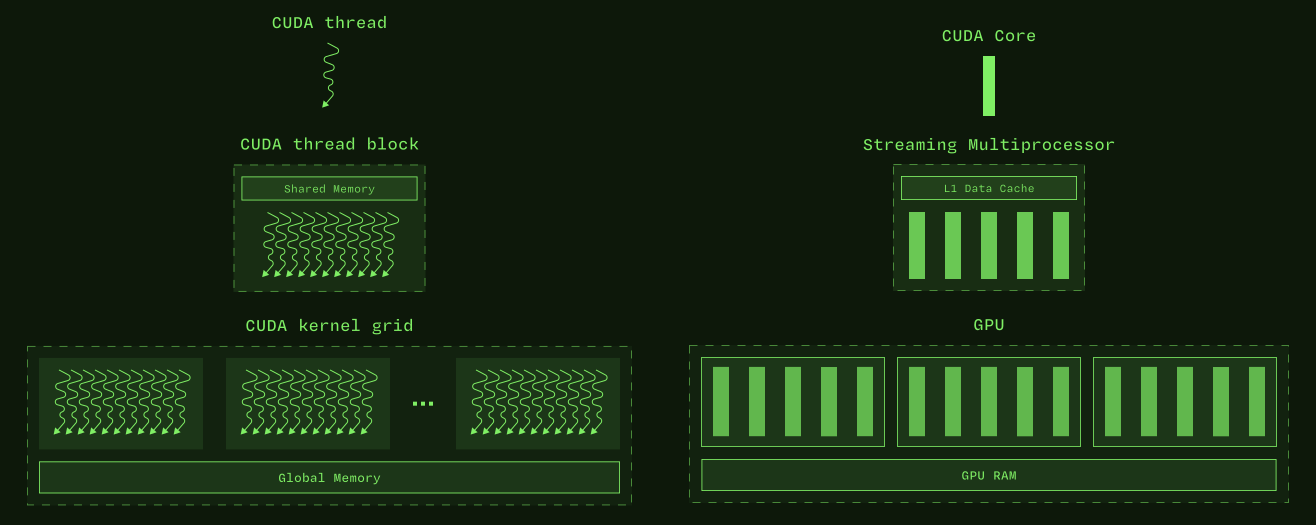
CUDA Thread Block (Block)
A thread block is a level of the CUDA programming model's thread hierarchy below a grid but above a thread. Blocks are the smallest unit of thread coordination exposed to programmers in the CUDA programming model. Blocks must execute independently, so that any execution order for blocks is valid, from fully serial in any order to all interleavings.
How we define the blocks is in our hands, and it plays a major role in the performance of the program. there's a hard limit to the max block size, and it depends on the GPU. So an optimal block size is very GPU specific. That makes it even more important, you can think of this as some kind of hyperparameter tuning.
you can read this for more details.
Kernels
A kernel is the unit of CUDA code that programmers typically write and compose, similar to a procedure or function in languages targeting CPUs. A kernel is called ("launched") once and returns once, but is executed many times, once each by a number of threads. These executions are generally concurrent (their execution order is non-deterministic) and parallel (they occur simultaneously on different execution units).
Since all programs are heterogeneous, kernels are a part of the host code, and we need to write kernels in C++ and compile them to PTX (Parallel Thread Execution) code, which is then compiled to machine code by the GPU driver. Only the kernels are executed on the GPU, the rest of the code is executed on the CPU.
Refer to CUDA Intro kernels for examples.
These kernels should give a good idea of how kernels work. Now we'll discuss the details of why blocks and stuff are placed on GPUs SMs. This is taken from How CUDA Programming Works
Why blocks and stuff are placed on GPUs SMs?
Lets see the following images to understand the resources available on a GPUs SM.
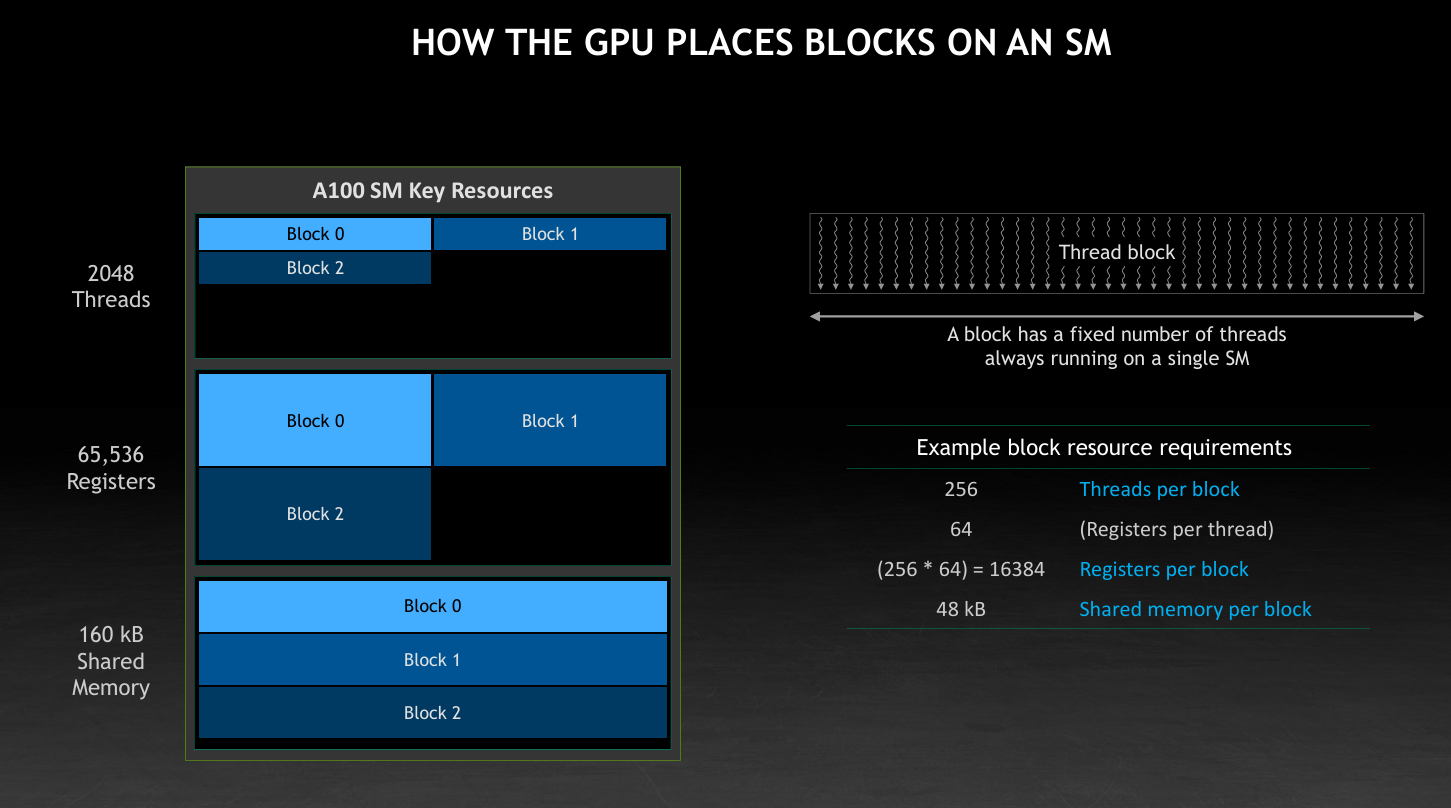
As you can see from the image clearly we have 2048 threads in a SM, 65536 threads, 160 KB of shared Memory. Now you can see clearly your block is not able to fully utilize the SM resources. Because your program requires more shared memory than the SM has. so the threads and registers are not able to be used fully. So here we need to reduce the shared memory usage of the program.
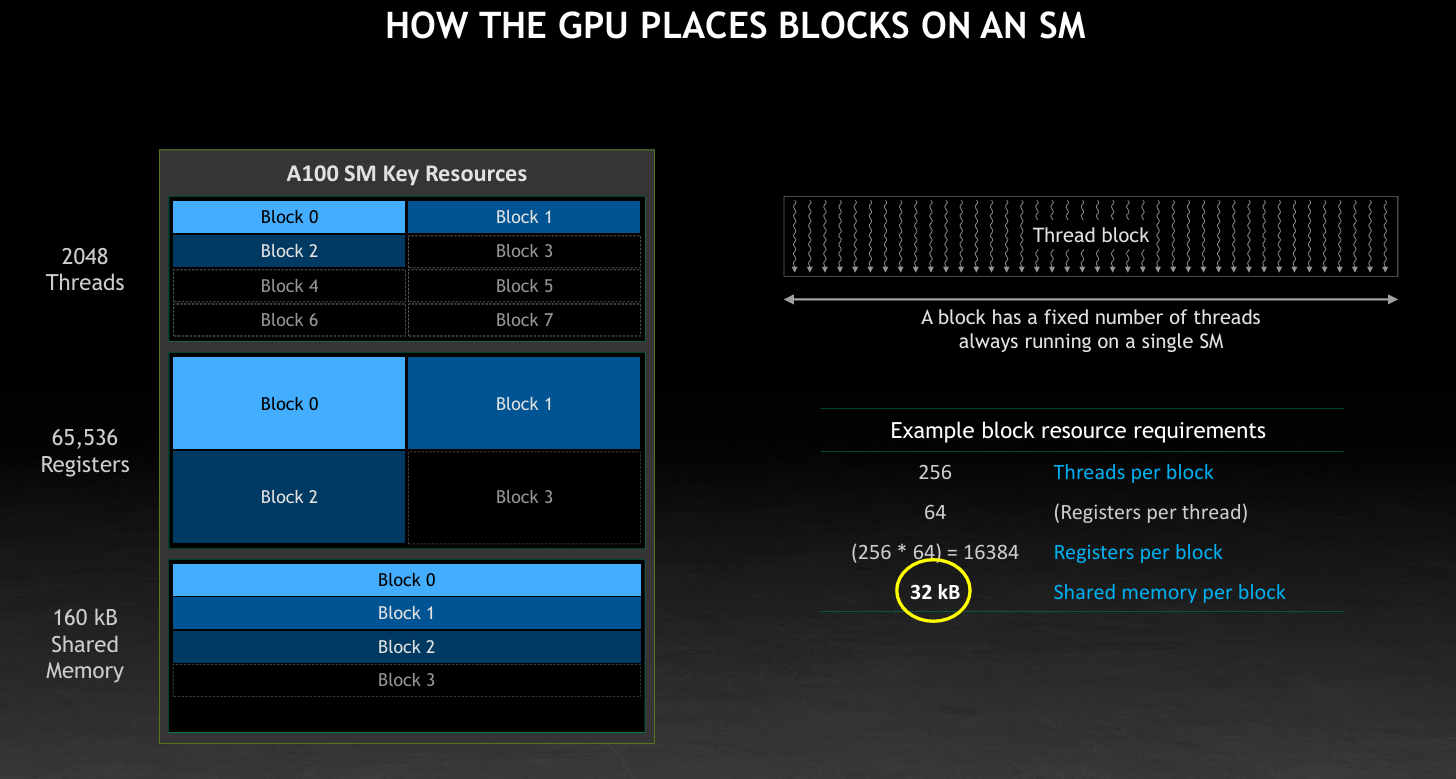
Now you can see clearly your block is able to better utilize the SM resources. Because your program requires less shared memory than the SM has. so the threads and registers are able to be used better. So understanding these concepts becomes essential how resources are utilized within the GPU by our program.